Why Your Static Site Is Serving Yesterday's Content — And the Diagnostic Path to Fixing It
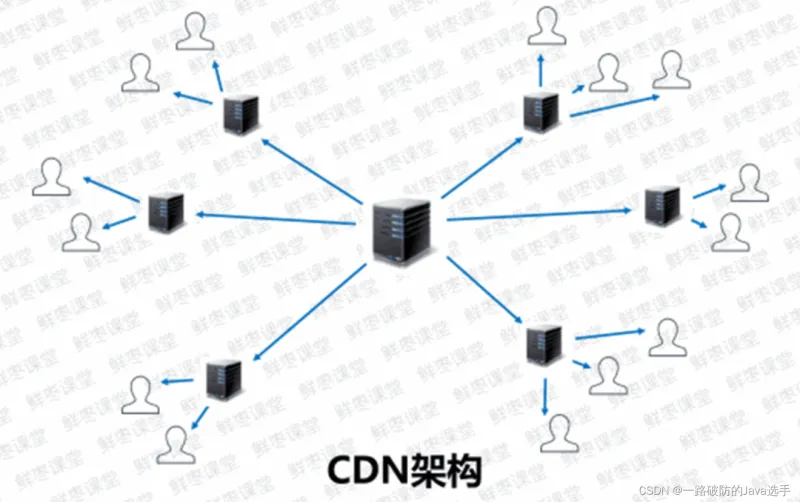
Photo: CDN server cache network debugging developer tools infrastructure, via i-blog.csdnimg.cn
There is a particular frustration reserved for the moment a developer deploys a critical update to a static site, confirms the build artifacts are correct in the origin bucket, and then watches a colleague in a different city report that nothing has changed. The new content exists. It is deployed. And yet some users — not all, not consistently — are still receiving the previous version.
This is the stale content problem, and it is more common in static deployments than the ecosystem's marketing materials tend to acknowledge. The irony is that the very mechanisms that make static sites fast — aggressive caching at multiple layers — are the same mechanisms that make stale content bugs difficult to isolate and fix. Understanding the failure modes requires a clear mental model of every cache layer between your build output and your end user's screen.
The Layered Cache Architecture and Where Each Layer Fails
A typical static site deployment involves at least four distinct caching layers, each operating independently with its own TTL logic, invalidation API, and failure mode.
The CDN edge layer is the first and most commonly implicated culprit. When you deploy new artifacts to your origin — whether that is an S3 bucket, a Cloudflare Pages project, or a Netlify deployment — the CDN's edge nodes do not automatically discard their cached copies. Unless you explicitly trigger a cache purge, edge nodes will continue serving the previous version until their cached TTL expires. On a well-configured CDN, that TTL might be set to 24 hours or longer for static assets. A deploy without a corresponding purge is a deploy that most users will not see for hours.
Every major CDN exposes a purge API. Vercel, Netlify, and Cloudflare Pages all integrate purge operations into their deployment pipelines by default — but only for their native hosting products. Organizations using a custom CDN layer in front of an object storage origin must wire up purge calls manually. This is a common oversight in teams that migrate from a managed hosting platform to a self-managed architecture.
The intermediate proxy layer introduces a second caching tier that developers frequently forget exists. Corporate networks, ISPs, and regional reverse proxies can all cache HTTP responses independently of the CDN. These caches are largely outside your control. The most effective defense is ensuring your response headers explicitly signal caching intent. The Cache-Control: no-store directive for HTML documents — combined with content-addressed, immutable fingerprinted URLs for assets — is the standard pattern that prevents intermediate proxies from holding stale HTML while allowing aggressive caching of versioned JavaScript and CSS bundles.
The browser cache operates on whatever Cache-Control and ETag headers your CDN returns. If your CDN is configured to strip or override these headers, the browser will fall back to heuristic caching, which typically means caching responses for a percentage of their apparent age. This heuristic behavior is defined in RFC 7234 and is not a bug — but it produces unpredictable TTLs that vary by browser and can result in stale content persisting for hours after a deploy.
The service worker cache is the most dangerous layer for static deployments that use progressive web app features. A service worker intercepts network requests at the browser level and can serve responses from its own cache indefinitely, independent of HTTP headers, CDN purges, or browser cache eviction. A service worker with a poorly implemented update strategy will continue serving a stale application shell even after dozens of deployments.
Real-World Case Studies
The Fingerprinting Gap
A marketing technology company based in Denver deployed a static documentation site built with a popular site generator. The generator fingerprinted JavaScript and CSS assets correctly — every file received a content hash in its filename — but HTML files were deployed with flat, non-versioned names such as index.html. The CDN was configured with a 12-hour TTL on all responses.
After a content update, the team triggered a CDN purge for the modified HTML files. What they did not account for was a second CDN layer operated by their enterprise network provider, which had cached the HTML independently. Users on the corporate network continued to receive the old HTML, which referenced the old asset filenames. When those old filenames were requested, the CDN returned 404 responses because the fingerprinted assets had changed. The result was a partially broken site for corporate users for nearly eight hours.
The fix required two changes: adding explicit Cache-Control: no-cache headers specifically to HTML responses, and implementing a deployment notification webhook that triggered purges on both CDN layers simultaneously.
The Service Worker Trap
A nonprofit organization in Seattle launched a static fundraising site with an offline-capable service worker intended to improve performance on mobile connections. The service worker used a cache-first strategy for all responses, including HTML. When the organization updated its donation form six months later, a significant portion of returning visitors — those whose service workers had cached the old application shell — continued to see the previous form.
The organization had not implemented a service worker update lifecycle. The updated service worker was delivered to browsers, but because the page was controlled by the old worker, the new worker entered a waiting state and never activated. Visitors who did not close all tabs of the site for an extended period never received the update.
The resolution involved shipping a service worker update that included a skipWaiting() call and a clients.claim() invocation, combined with a versioned cache name that forced the new worker to rebuild its cache from scratch on activation.
The Diagnostic Checklist
When stale content is reported in a static deployment, work through the following sequence before drawing conclusions.
-
Verify the origin directly. Fetch the affected URL with a tool such as
curlusing the--resolveflag to bypass DNS and hit the origin bucket or server directly. Confirm that the origin is serving the correct version. -
Inspect CDN cache headers. Use
curl -Iagainst the production URL and examine theAge,X-Cache, andCF-Cache-Status(or equivalent) response headers. AnAgevalue greater than zero indicates the response is being served from cache. Note theCache-Controlvalue the CDN is returning. -
Trigger an explicit purge and retest. Use your CDN's dashboard or API to purge the affected URL. Wait 30 seconds and repeat the header inspection. If the
Ageheader resets to zero and the correct content is returned, the CDN layer was the source of the problem. -
Test from a private browsing window on a different network. This eliminates browser cache and, in many cases, intermediate corporate proxy caches from the equation. If the correct content appears here but not in a standard browser session, the issue is local to the browser cache or a service worker.
-
Inspect service worker registration in DevTools. In Chrome DevTools, navigate to Application > Service Workers. Confirm whether a service worker is registered and whether an updated version is in a
waitingstate. If so, click "Skip waiting" to force activation and verify whether the correct content appears. -
Audit your
Cache-Controlheader strategy. HTML documents should carryCache-Control: no-cacheorCache-Control: max-age=0, must-revalidate. Fingerprinted assets should carryCache-Control: public, max-age=31536000, immutable. Any deviation from this pattern is a potential source of stale content.
Building a Deployment Pipeline That Prevents Recurrence
The most durable solution to stale content is a deployment pipeline that treats cache invalidation as a first-class step rather than an afterthought. This means automating CDN purge calls as part of every deployment, instrumenting deployments with a version token embedded in a <meta> tag or HTTP response header, and building a lightweight monitoring check that fetches the production URL immediately after deployment and asserts the expected version token is present.
For teams using service workers, adopting a stale-while-revalidate strategy for HTML — rather than cache-first — provides a reasonable balance between offline capability and content freshness. The Workbox library, maintained by Google, implements this pattern with production-tested logic that handles the service worker update lifecycle correctly.
Static sites are fast because they lean on caching. But caching without deliberate invalidation strategy is a latent bug waiting for the next important deploy. The teams that treat cache layer management as infrastructure — not as an operational detail — are the ones whose users reliably see what was shipped.