Stale at the Edge: Diagnosing and Solving Cache Invalidation Failures in Static Deployments

Photo: server network edge nodes data propagation infrastructure abstract, via webhoster.de
You push a critical update. The deployment pipeline reports success. You refresh the page and see the old version staring back at you. Twenty minutes later, a colleague in a different city confirms they can see the change. Your users in the Pacific Northwest are still on the previous version two hours after that.
This is not a deployment failure. It is a cache invalidation failure—and it is one of the most consequential, least-discussed operational challenges in static web delivery.
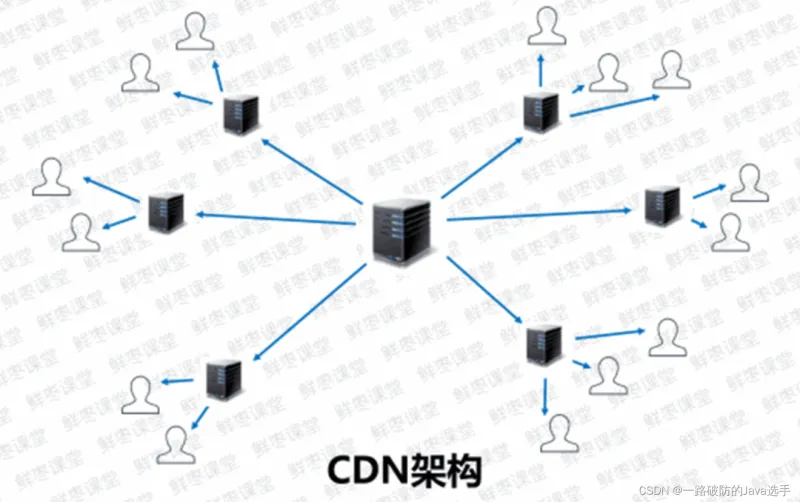
Static architecture is built on a foundational promise: serve pre-built assets from the edge, close to the user, without touching an origin server on every request. That promise is genuinely powerful. But it creates a distributed state problem that demands deliberate engineering. When your content lives on dozens or hundreds of edge nodes simultaneously, updating it is not a single operation. It is a coordinated propagation event across a system you do not fully control.
Understanding the Full Cache Stack
Most engineers think about caching in one layer at a time. In practice, a single HTTP response passes through at least three distinct caching systems before reaching the user—and each one can independently serve stale content.
Browser cache is the first and most persistent offender. When a browser stores an asset with a Cache-Control: max-age=86400 header, that user will not request a new version for 24 hours regardless of what you do at the CDN level. No purge API call reaches the browser. No edge invalidation touches local storage. The only mechanisms available to you are immutable asset fingerprinting, no-store directives for genuinely dynamic responses, and service worker cache management for applications that have opted into that complexity.
CDN edge caches are the layer most developers target when they think about invalidation, and rightly so. Major providers—Cloudflare, Fastly, AWS CloudFront, and Akamai—each expose purge and invalidation APIs, but their behavior differs in ways that matter operationally. Cloudflare's cache purge by URL is near-instantaneous globally but subject to API rate limits. CloudFront's invalidation requests are eventually consistent, with propagation times that can stretch to 15 minutes under normal conditions and longer during high-traffic periods. Fastly's instant purge, built on surrogate keys, is arguably the most surgical option available but requires deliberate tagging during the initial response.
Origin or CDN shield caches represent a third layer that many teams overlook entirely. When a CDN is configured with a shield or origin shield node—a regional intermediary that absorbs requests before they reach the true origin—that node maintains its own cache. A successful edge purge that does not also clear the shield will result in the edge node re-fetching stale content from the shield and re-caching it. The purge appears to succeed, the content remains stale, and the debugging session begins.
The Propagation Delay Problem
Even when every layer is configured correctly, invalidation is not atomic. Edge networks are geographically distributed systems, and purge signals propagate at finite speed. A deployment that triggers invalidation at 2:00 PM EST may complete propagation in Chicago within 30 seconds and in Seattle within four minutes, while a node in a less-trafficked region may not receive the signal for considerably longer.
This creates a temporal inconsistency window during which different users receive different versions of your site. For content updates this is frequently acceptable. For security patches, legal copy changes, or pricing corrections, it may not be.
The practical mitigation for high-stakes updates is not to eliminate propagation delay—that is not achievable—but to minimize the content surface area that requires invalidation. The more of your static site that uses fingerprinted, immutable asset URLs, the smaller the set of files that need active invalidation on any given deployment.
Fingerprinting as Structural Invalidation
Content-addressed filenames are the most reliable invalidation mechanism available because they sidestep the problem entirely. When your build tool appends a hash to every CSS, JavaScript, and image filename—main.a3f9c2.css rather than main.css—each deployment produces unique URLs for changed assets. The old URL remains valid and cached; the new URL is simply never cached yet.
The HTML document that references these assets is the only file requiring active invalidation, and it is typically the smallest, least-cached file in your deployment. Setting a short TTL or no-cache directive on HTML entry points while using long-lived immutable directives on fingerprinted assets is the standard pattern for a reason: it concentrates invalidation complexity onto the smallest possible surface.
This architecture requires that your build tool generates consistent, deterministic hashes—rebuilding the same source content should produce the same hash. Vite, webpack, and most modern static site generators satisfy this requirement. Verify yours does before depending on it.
CDN-Specific Configuration Patterns
For teams operating on CloudFront, the most important configuration decision is whether to use versioned S3 object paths rather than in-place overwrites. Deploying to /v1.4.2/ prefixes and updating a CloudFront origin path or distribution configuration is a harder operation but eliminates the propagation race condition entirely. For teams that deploy in place, creating invalidation requests for /* is functional but costs money per invalidation path and does not guarantee immediate consistency.
Fastly users should invest time in surrogate key tagging from the first deployment. Assigning semantic keys—content-type:blog, page:homepage, section:pricing—to responses at the origin allows targeted bulk invalidation without full-cache purges. The operational overhead of maintaining a tagging taxonomy pays dividends the first time you need to invalidate a content category without touching unrelated assets.
Cloudflare offers Cache Rules (formerly Page Rules) that allow TTL and cache behavior to be defined by URL pattern without modifying origin response headers. This is particularly useful when you do not control the server generating headers—a common scenario when deploying to third-party static hosting platforms. Cache Rules also support Cache-Control: stale-while-revalidate, which serves cached content immediately while fetching a fresh copy in the background, reducing perceived latency during the invalidation window.
Building a TTL Strategy by Content Type
A single TTL value applied uniformly across a static site is an engineering compromise that serves no content type particularly well. A more defensible approach maps TTL decisions to content volatility and business consequence.
| Content Type | Recommended TTL | Invalidation Trigger |
|---|---|---|
| Fingerprinted JS/CSS | 1 year (immutable) |
Never (URL changes) |
| Images (versioned) | 1 year (immutable) |
Never (URL changes) |
| HTML entry points | 60–300 seconds | Every deployment |
| API responses (semi-static) | 60–900 seconds | Data change event |
| Legal/compliance pages | 60 seconds or no-cache |
Any edit |
The HTML entry point row deserves emphasis. Many teams set long TTLs on HTML documents in pursuit of cache hit ratios, then discover that their invalidation pipeline is the only thing standing between a deployment and their users. Short TTLs on HTML are not a performance failure—they are a correctness guarantee, and the performance cost is modest given typical HTML document sizes.
Debugging a Live Invalidation Failure
When a deployment appears complete but users report stale content, the diagnostic sequence should be systematic rather than reactive. Begin with curl -I against the affected URL from multiple geographic origins—services like curl.trillworks.com or simple EC2 instances in different AWS regions serve this purpose. Examine the Age response header: a high value confirms the CDN is serving a cached copy and has not received or processed the invalidation signal.
Next, check the X-Cache and provider-specific headers (CF-Cache-Status, X-Served-By, X-Cache-Hits) to identify which cache layer is responding. If the edge reports a cache miss but the browser still shows stale content, the problem is local. If the edge reports a hit with a high age value, the purge has not propagated to that node.
Finally, query your CDN provider's invalidation API or dashboard to confirm the purge job completed without errors. Rate limit failures and malformed URL patterns are common causes of silent invalidation failures that appear successful in deployment logs.
The Operational Discipline Behind Fast Propagation
Cache invalidation in static deployments is not a problem to be solved once and forgotten. It is an operational discipline that requires consistent architectural decisions, provider-specific configuration knowledge, and a clear mental model of the full cache stack.
The teams that ship confidently—and whose users consistently see current content—are not necessarily using the most sophisticated tooling. They have mapped their content types to appropriate TTL values, built fingerprinting into their asset pipeline, integrated purge API calls into their deployment automation, and tested invalidation behavior before a high-stakes update forces the question.
Static delivery is fast because it is cached. Keeping it correct requires knowing exactly how to uncache it.